Saturday, September 26, 2015

Compilation And Simulation Directives


Compilation And Simulation Directives:


Conditional Compilation directive switches vs Simulation directive switches


Verilog has following conditional compiler directives.


`ifdef

`else

`elsif

`endif

`ifndef


The `ifdef compiler directive checks for the definition of a text_macro_name. If the text_macro_name is defined, then the lines following the `ifdef directive are included. If the text_macro_name is not defined and an `else directive exists, then this source is

compiled. The `ifndef compiler directive checks for the definition of a text_macro_name. If the text_macro_name is not defined, then the lines following the `ifndef directive are included. If the text_macro_name is defined and an `else directive exists, then this source is compiled. If the `elsif directive exists (instead of the `else) the compiler checks for the definition of the text_macro_name. If the name exists the lines following the `elsif directive are included. The `elsif directive is equivalent to the compiler directive sequence `else `ifdef ... `endif. This directive does not need a corresponding `endif directive. This directive must be preceded by an `ifdef or `ifndef directive.


EXAMPLE:

module switches();


initial

begin

`ifdef TYPE_1

$display(" TYPE_1 message ");

`else

`ifdef TYPE_2

$display(" TYPE_2 message ");

`endif

`endif

end

endmodule


Compile with +define+TYPE_1

Then simulate,result is


RESULT:


TYPE_1 message


Compile with +define+TYPE_2

Then simulate,result is


RESULT:


TYPE_2 message


TYPE_1 and TYPE_2 are called switches.


In the above example, When TYPE_1 switch is given, statement " $display(" TYPE_1 message "); " is only compile and statement " $display(" TYPE_2 message "); " is not compiled.

Similarly for TYPE_2 switch. It wont take much time to compile this small example. Compilation time is not small for real time verification environment. Compiler takes time for each change of conditional compilation switches.


Simulation directives are simple. This is archived by `define macros. The following example demonstrated the same functionality as the above example.


EXAMPLE:


module switches();


initial

begin

if($test$plusargs("TYPE_1"))

$display(" TYPE_1 message ");

else

if($test$plusargs("TYPE_2"))

$display(" TYPE_2 message ");

end

endmodule


No need to give +define+TYPE_1 or +define+TYPE_2 during compilation


Simulate with +TYPE_1


RESULT:


TYPE_1 message


Simulate with +TYPE_2

Then simulate,result is


RESULT:


TYPE_2 message


With the above style of programing,we can save recompilation times.


This system function searches the list of plusargs (like the $test$plusargs system function) for a user specified plusarg string. The string is specified in the first argument to the system function as either a string or a register which is interpreted as a string. If the string is found, the remainder of the string is converted to the type specified in the user_string and the resulting value stored in the variable provided. If a string is found, the function returns a non-zero integer. If no string is found matching, the function returns the integer value zero and the variable provided is not modified.


%d decimal conversion

%o octal conversion

%h hexadecimal conversion

%b binary conversion

%e real exponential conversion

%f real decimal conversion

%g real decimal or exponential conversion

%s string (no conversion)


The first string, from the list of plusargs provided to the simuator, which matches the plusarg_string portion of the user_string specified shall be the plusarg string available for conversion. The remainder string of the matching plusarg (the remainder is the part of the plusarg string after the portion which matches the users plusarg_string) shall be converted from a string into the format indicated by the format string and stored in the variable provided. If there is no remaining string, the value stored into the variable shall either be a zero (0) or an empty string value.


Example


module valuetest();


integer i;

real r;

reg [11:0] v;

reg [128:0] s;


initial

begin

if($value$plusargs("STRING=%s",s))

$display(" GOT STRING ");

if($value$plusargs("INTG=%d",i))

$display(" GOT INTEGER ");

if($value$plusargs("REAL=%f",r))

$display(" GOT REAL ");

if($value$plusargs("VECTOR=%b",v))

$display(" GOT VECTOR ");


$display( " String is %s ",s);

$display(" Integer is %d ",i);

$display(" Realnum is %f ",r);

$display(" Vector is %b ",v);

end


endmodule


Compilation :

command filename.v

Simulation :

command +STRING=rrf +INTG=123 +REAL=1.32 +VECTOR=10101


RESULTS:


GOT STRING

GOT INTEGER

GOT REAL

GOT VECTOR

String is rrf

Integer is 123

Realnum is 1.320000e+00

Vector is 000000010101


//copied from testbench.in & edited

Friday, September 25, 2015

Keyboard shortcuts to ease your office work

1.You can easily move between worksheets in a workbook by using Ctrl+Pg Up and Ctrl+Pg Down
2. cntrl shift + T // to open previously closed window.
3. window + L    // to lock your account
4. ctrl+alt+delete    // to change the system PWD


// You can add more in the comment sections
// thanks for coming here ...

Friday, July 10, 2015

Unix Commands

1. grep <string> *                     // to sort
2. grep -c  "error" logfile.txt    // to see  how many times the word error has printed in log file
3. qlicense  // to check the license in unix
4. irun         //to use the cadence simulator
5. zgrep <string> // to grep in a z file
6. grep A|B // to grep string in A or B
7. meld <file A> <file B> // to compare two files
8. tkdiff // to compare two files
9. grep - l "main"  *.sv  // will list all the .sv files which contents had main

Sunday, June 1, 2014

Is there any way to do swapping of two variables in one instruction

Is there any way to do swapping of two variables in one instruction i.e in one line only ? (Note : weknow that we can swap two variables without using any temporary variable using with 2 methods(XOR and summation method) but that would require three instructions ,but i want solution in only one instruction.

ans:

int main() { int num1 = 10; int num2 = 20; //swap the numbers num1 = num1 + num2 - (num2 = num1); //swapped return 0; }

copied from a site, check whether its working or not ...

Thursday, August 22, 2013

Difference between uvm_component and uvm_object

What is the difference between uvm_component and uvm_object?
OR
We already have uvm_object, why do we need uvm_component which is actually derived class of uvm_object?


uvm_component is a static entity and always tied(bind) to a given hardware and/or a TLM interface
uvm_object is a dynamic entity and is not tied to any hardware/TLM interface

uvm_component like uvm_driver is always connected to a particular DUT interface because throughout the simulation its job is fixed i.e. to drive the designated signals into DUT

uvm_object like uvm_transaction is not connected to any particular DUT interface and its fields can take any random value based on randomization constraints.

Though uvm_component is derived from uvm_object, uvm_component has got these additional interfaces
* Hierarchy provides methods for searching and traversing the component hierarchy.
* Phasing defines a phased test flow that all components follow, with a group of standard phase methods and an API for custom phases and multiple independent phasing domains to mirror DUT behaviour e.g. power
* Configuration provides methods for configuring component topology and other parameters ahead of and during component construction.
* Reporting provides a convenient interface to the uvm_report_handler. All messages, warnings, and errors are processed through this interface.
* Transaction recording provides methods for recording the transactions produced or consumed by the component to a transaction database (vendor specific).
* Factory provides a convenient interface to the uvm_factory. The factory is used to create new components and other objects based on type-wide and instance-specific configuration


Thanks!


DUT - Design Under Test
TLM - Transaction Level Modelling
API - Application Programming Intefaces

Sample STMicroelectronics interview questions


Sample HR question which I need to prepare


1. Tell me about yourself?


2. Why do you want to work for STMicroelectronics?


3. Do you know anyone who works for STMicroelectronics?


4. Why should STMicroelectronics hire you?


5. What can you do for this company?


6. What can you do for STMicroelectronics that other candidates can’t?


7. How would your past experience translate into success in this job?


8. Explain how you would be an asset to STMicroelectronics?


9. What do you know about STMicroelectronics?


10. Please tell me some products/services of STMicroelectronics in the market? What are likes/dislikes of them?


11. If you worked for STMicroelectronics, what are you doing?


12. Please tell me some products/services that are competitors of STMicroelectronics’s in the market? And what are differences?


13. Why have you applied for this particular job for this field?


14. What do you like about your present job for this field?


15. What have you learned from your mistakes?


16. What do you dislike about your present job for this field?


17. What are the most difficult decisions to make?


18. How would you describe your work style?


19. Are you overqualified for this job?


20. Why do you want to leave your current employer?


Wednesday, June 19, 2013

Semaphore

Semaphore is used for lock/unlock of a common resource. If resource is in unlock state the resource can be used, if it is in lock state, then it can not be used.

Lets assume that in a Verification env, we have single ethernet port/driver and there are 2 packet generators using this one ethernet port, one generating normal frames and other generating flow control (pause) frames.

So each of this two packet generators can use semaphone to if ethenet driver is free (unlock) state, before it can transmit the frame. So if the driver is free, then it locks the drivers and transmits the frame, once tramitted, it unlocks the drivers.


When driver is in lock state, it will wait till driver is in unlock state.
Semaphore in SystemVerilog supports following methods for above operations.


Semaphore allocation : new()
Using semaphore keys : get()
Returing semaphore keys : put()
Try to obtain one or more keys without blocking: try_get()

new()
Semaphores are created with the new() method.
function new(int keyCount = 0 );
Where
keycount : The keyCount specifies the number of keys initially allocated to the semaphore bucket.
The new() function returns the semaphore handle or, if the semaphore cannot be created, null.


put()
The semaphore put() method is used to return keys to a semaphore.
task put(int keyCount = 1);
Where
The keyCount specifies the number of keys being returned to the semaphore. The default is 1.

get()
The semaphore get() method is used to procure a specified number of keys from a semaphore.
task get(int keyCount = 1);
Where
The keyCount specifies the required number of keys to obtain from the semaphore. The default is 1.
If the specified number of keys is not available, the process blocks until the keys become available.
The semaphore waiting queue is first-in first-out (FIFO).

try_get()
The semaphore try_get() method is used to procure a specified number of keys from a semaphore, but without blocking.
function int try_get(int keyCount = 1);
Where
The keyCount specifies the required number of keys to obtain from the semaphore. The default is 1.
If the specified number of keys is available, the method returns a positive integer and execution continues.
If the specified number of keys is not available, the method returns 0.


Example : Semaphore
1 program semaphore_ex; 
3 semaphore semBus = new(1); 
5 initial begin 
6 fork 
7 agent("AGENT 0",5); 
8 agent("AGENT 1",20); 
9 join 
10 end 
11 
12 task automatic agent(string name, integer nwait); 
13 integer i = 0; 
14 for (i = 0 ; i < 4; i ++ ) begin 
15 semBus.get(1); 
16 $display("[%0d] Lock semBus for %s", $time,name); 
17 #(nwait); 
18 $display("[%0d] Release semBus for %s", $time,name); 
19 semBus.put(1); 
20 #(nwait); 
21 end 
22 endtask 
23 
24 endprogram

-----------------------------------------------------------------------------------------------------------------------
Another Explanation of same thing :


Inter Process Communication: Semaphores

A semaphore allows you to control access to a resource. A semaphore is an equivalent of a key (or a set of keys) when a process tries to access a shared resource.

A semaphore is first associated with a resource that needs to be protected. Whenever a process wants to access this resource, it seeks a key from the semaphore. Depending on the availability of a key, a key is either allotted to the current process or not. If a key is allotted to a process when this process is done with using the resource, it will give the key back to the semaphore and that key may be allotted to other processes who are waiting for a key.

Syntactically, the semaphore is a built-in class that allows only certain pre-defined operations on the keys.

A semaphore declaration is shown below:


Built-in methods in Semaphore

There are 4 predefined methods inside a semaphore type class.
new( ): Create a semaphore with specified number of keys.
get( ): Obtain one or more keys from a sempahore and block until keys are available.
try_get( ): Obtain one or more kets from a semaphore without blocking.
put( ): Return one or more keys to a semaphore

new( )
Just as any other class, a semaphore needs a constructor.

The prototype declaration for new( ) is shown below:

The constructor new( ) has an integer argument key_count that can be used for creating a desired number of keys.
The default value of key_count is 0.
Upon success, the new( ) function returns the semaphore handle, otherwise, it returns null.

get( )
The get( ) task is used for obtaining one or multiple keys for a semaphore.

The prototype declaration for get( ) is shown below:

The number of keys to procure is passed as the argument to get( ).
The default value of this argument is 1.
If a process asks for certain number of kets and they are available, the call to get( ) returns and the execution continues.
If the required number of keys are not available, the call to get( ) blocks subsequent statements and waits for additional keys to be available. That is why get( ) is a task, not a function, and hence, can consume time.
All calls to get( ) are queued in a FIFO and keys are delivered in a first-come-first-serve basis.


try_get( )
If you do not want to block while trying to get keys for a semaphore, try_get( ) is your solution. Unlike get( ), try_get( ) is a function that checks for key availability and procures them if they are available (and returns 1). But, if they are not, try_get( ) does not block and returns 0.

The prototype for try_get( ) is shown below:


put( )
Now, suppose that a process is done with using a resource. According to the good code of conduct in the semaphore land, that process must return the keys (so that another process can use them). This is done by the put( ) task, where the number of returned kets are passes as an argument.

The prototype for put( ) is shown below:


#copied from internet : another resource

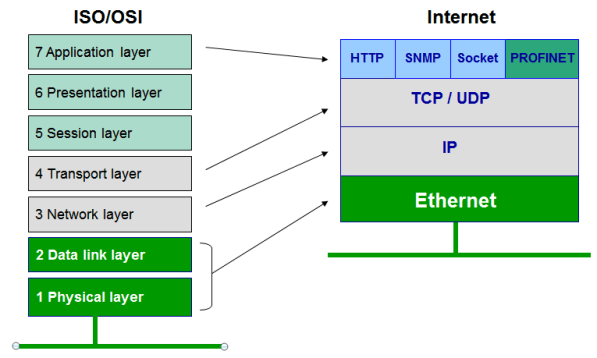
Ethernet and more

Ethernet is a protocol under IEEE 802.33 standard User Datagram Protocol (UDP) UDP is a connectionless transport protocol. I...